> ## Documentation Index
> Fetch the complete documentation index at: https://docs.examin8.com/llms.txt
> Use this file to discover all available pages before exploring further.
# Automated Mode
> Create paper using pre-filled bluprint. Best suitable for full syllabus question papers.
### **Step 1: Create a New Paper**
1. **Navigate to Exams**: Go to the **“Exams”** section.
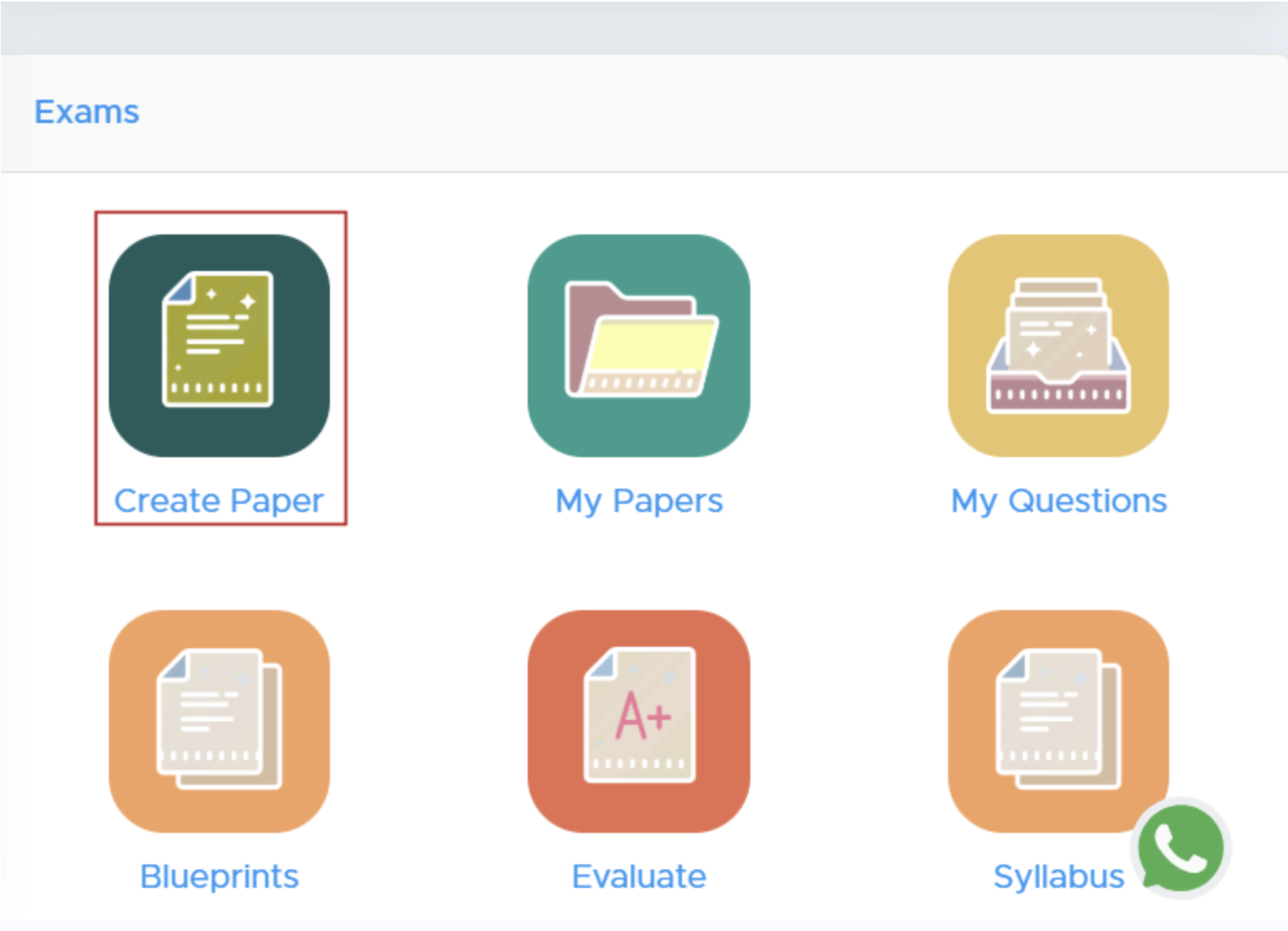 2. **Select ‘Create Paper’**: Click on the **'Create Paper'** button. New users must [add institute details](https://docs.examin8.com/getting-started) there to proceed.
### **Step 2: Select Class and Subject**
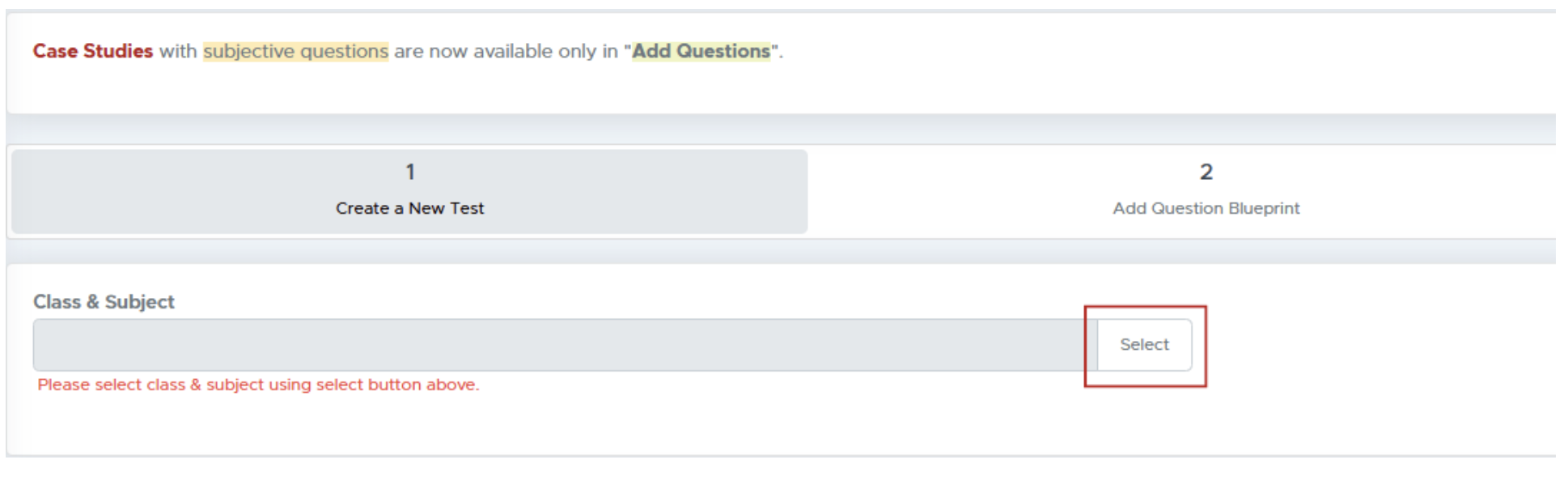
**Choose Class and Subject**: Click on the **“Select”** button to pick the class and subject for your test paper.
2. **Select ‘Create Paper’**: Click on the **'Create Paper'** button. New users must [add institute details](https://docs.examin8.com/getting-started) there to proceed.
### **Step 2: Select Class and Subject**
**Choose Class and Subject**: Click on the **“Select”** button to pick the class and subject for your test paper.
 ### **Step 3: Specify Course and Subject**
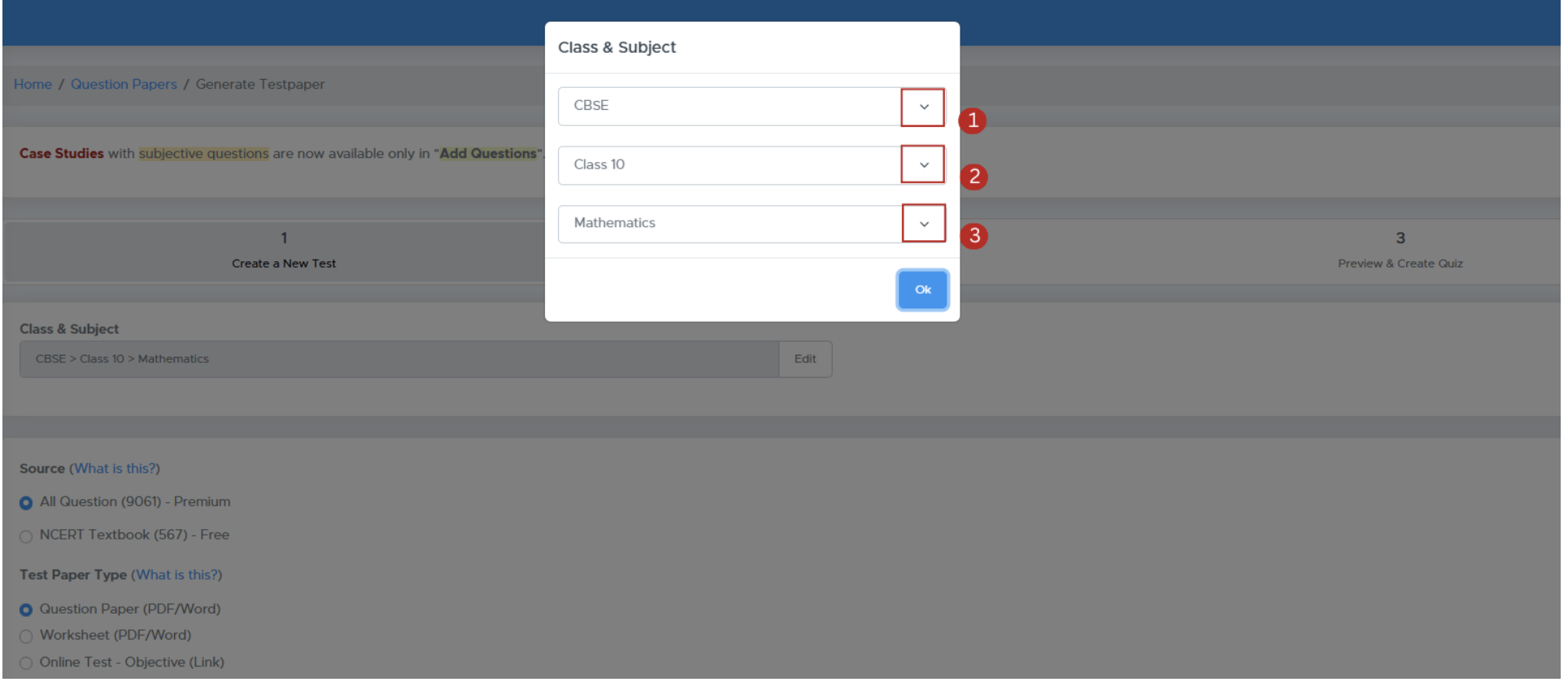
1. **Module Selection**: Choose from available modules (e.g., CBSE, ICSE).
2. **Select Course**: Choose the relevant course for the test.
3. **Competitive Exams**: If applicable, select the specific exam type and whether to create a single or multiple subject paper.
### **Step 3: Specify Course and Subject**
1. **Module Selection**: Choose from available modules (e.g., CBSE, ICSE).
2. **Select Course**: Choose the relevant course for the test.
3. **Competitive Exams**: If applicable, select the specific exam type and whether to create a single or multiple subject paper.
 ### **Step 4: Configure Test Paper Settings**
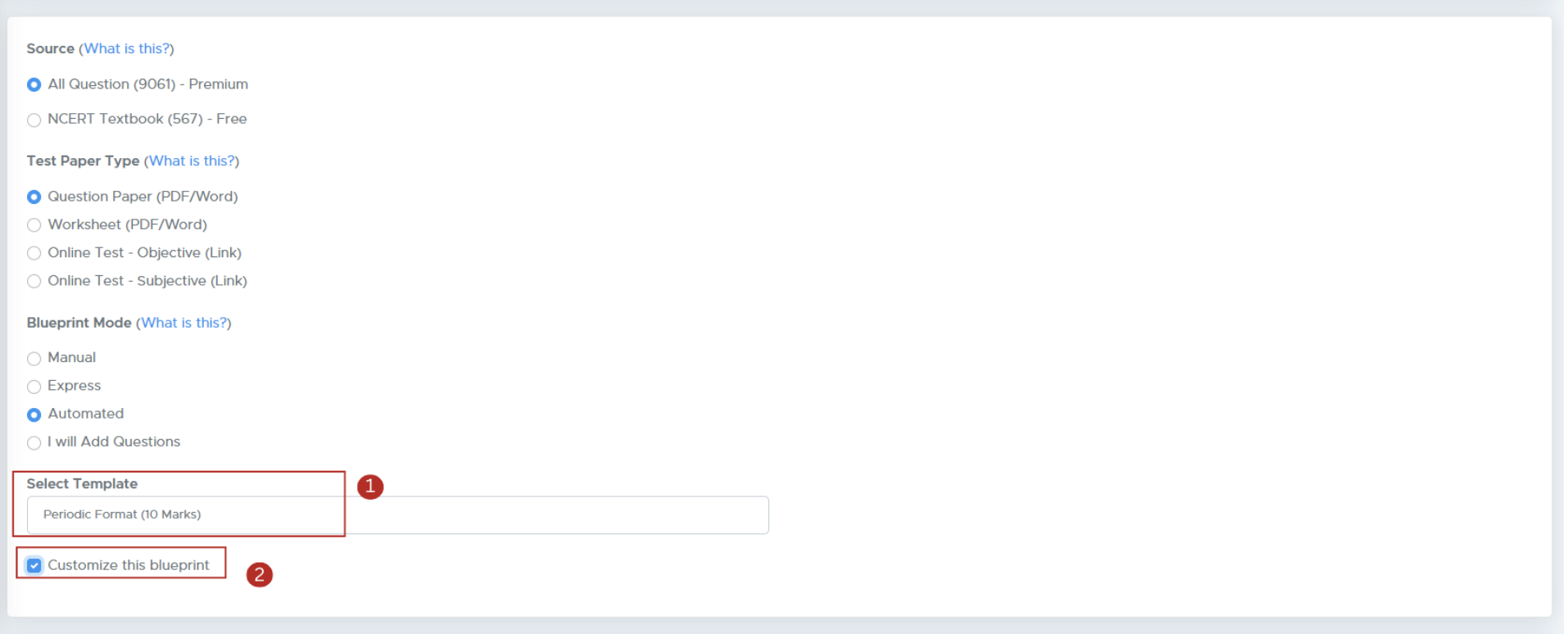
1. **Source Selection**: Choose your question source (e.g., All Questions or NCERT Textbook).
2. **Test Paper Type**: Decide the format (Question Paper, Worksheet, etc.).
### **Step 4: Configure Test Paper Settings**
1. **Source Selection**: Choose your question source (e.g., All Questions or NCERT Textbook).
2. **Test Paper Type**: Decide the format (Question Paper, Worksheet, etc.).
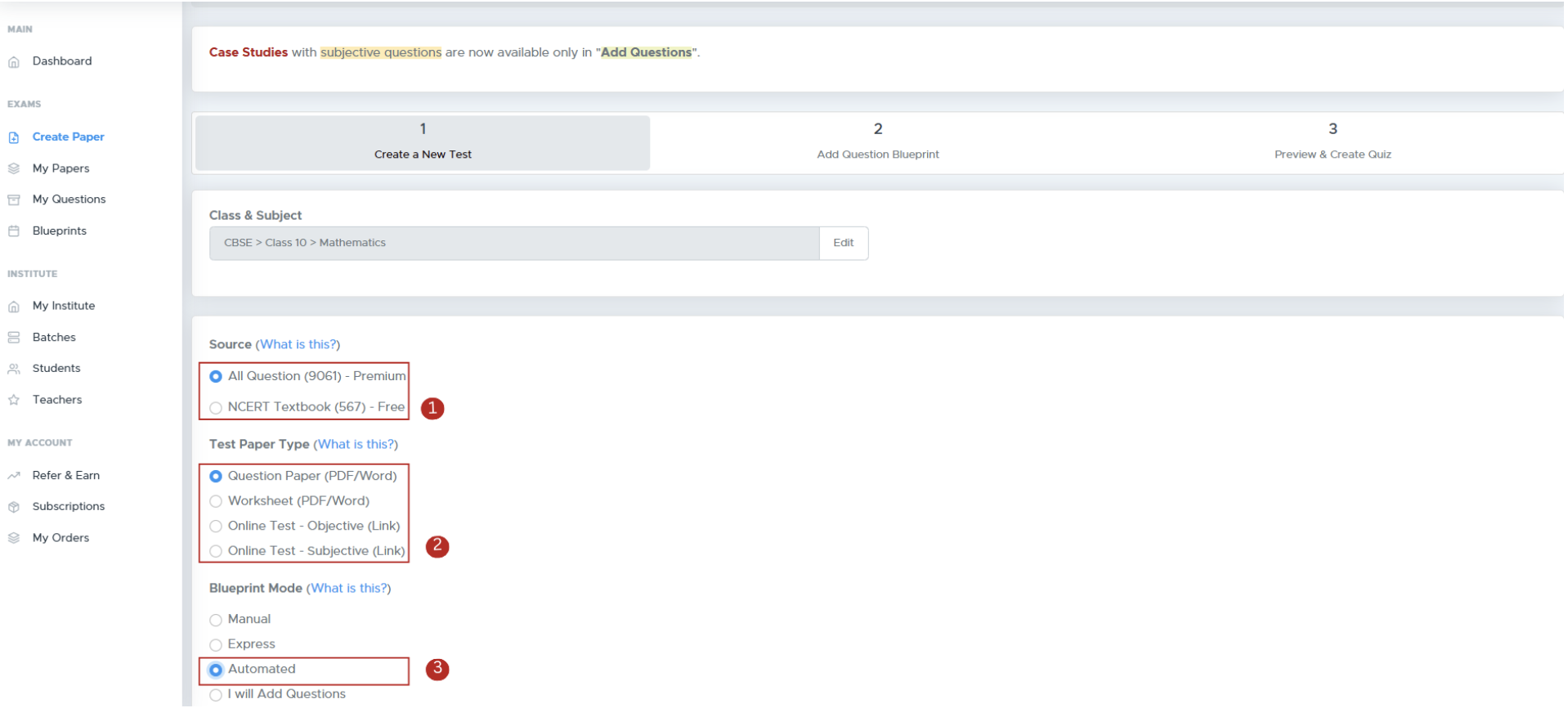 3. **Blueprint Mode**: Select how to structure your test.
* **Choose a Blueprint**: Pick the template that aligns with your test objectives and requirements.
* **Customize Blueprint**: Mark "Customize this Blueprint" to edit structure, questions, and other settings.
3. **Blueprint Mode**: Select how to structure your test.
* **Choose a Blueprint**: Pick the template that aligns with your test objectives and requirements.
* **Customize Blueprint**: Mark "Customize this Blueprint" to edit structure, questions, and other settings.
 ### **Step 5: Customize Paper Details**
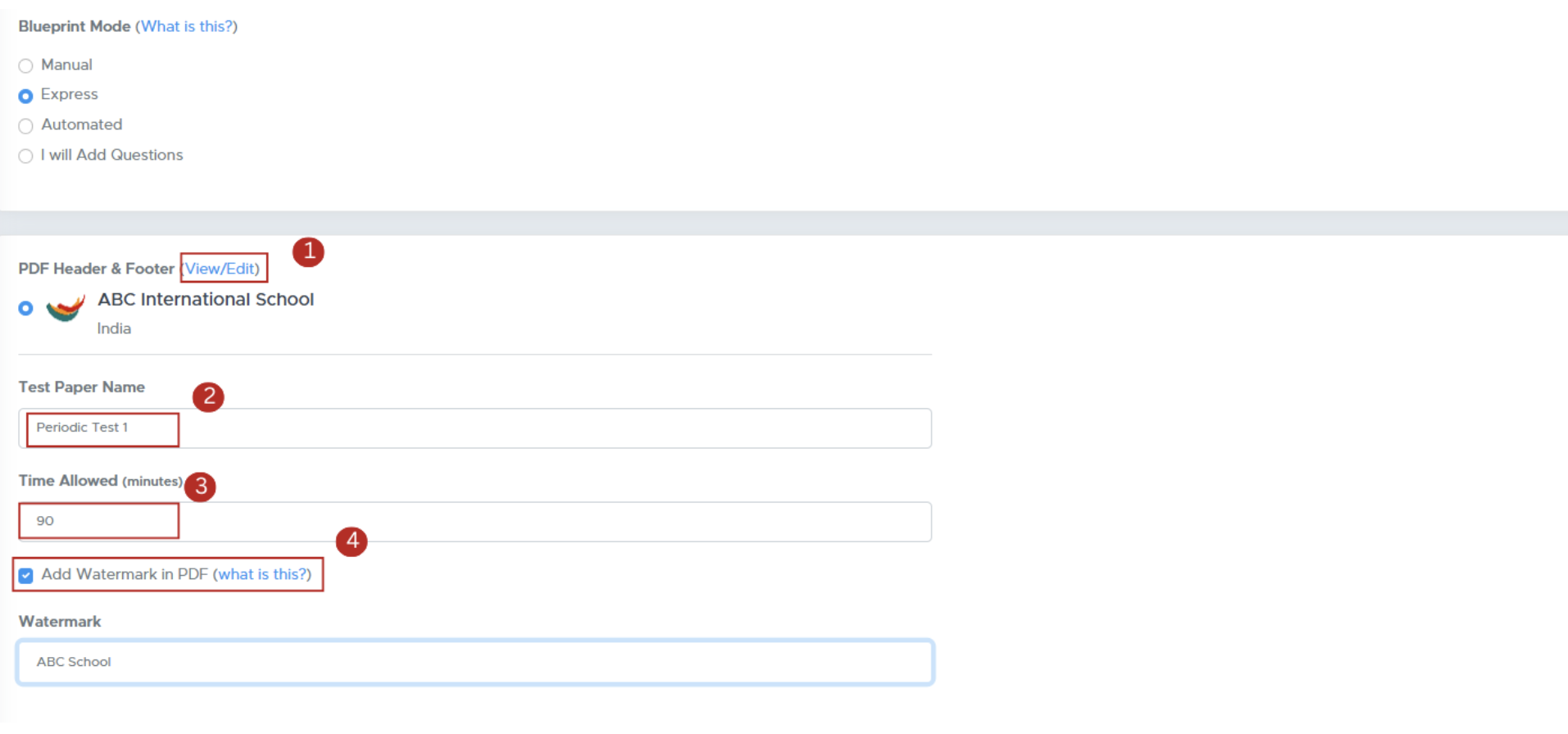
1. **Edit Header and Footer**: Modify your logo and header/footer text.
2. **Test Paper Name**: Enter the name for the test paper.
3. **Time Allowed**: Specify the duration for the test.
4. **Watermark and Marks**: Choose to add a watermark and show marks alongside each question.
### **Step 5: Customize Paper Details**
1. **Edit Header and Footer**: Modify your logo and header/footer text.
2. **Test Paper Name**: Enter the name for the test paper.
3. **Time Allowed**: Specify the duration for the test.
4. **Watermark and Marks**: Choose to add a watermark and show marks alongside each question.
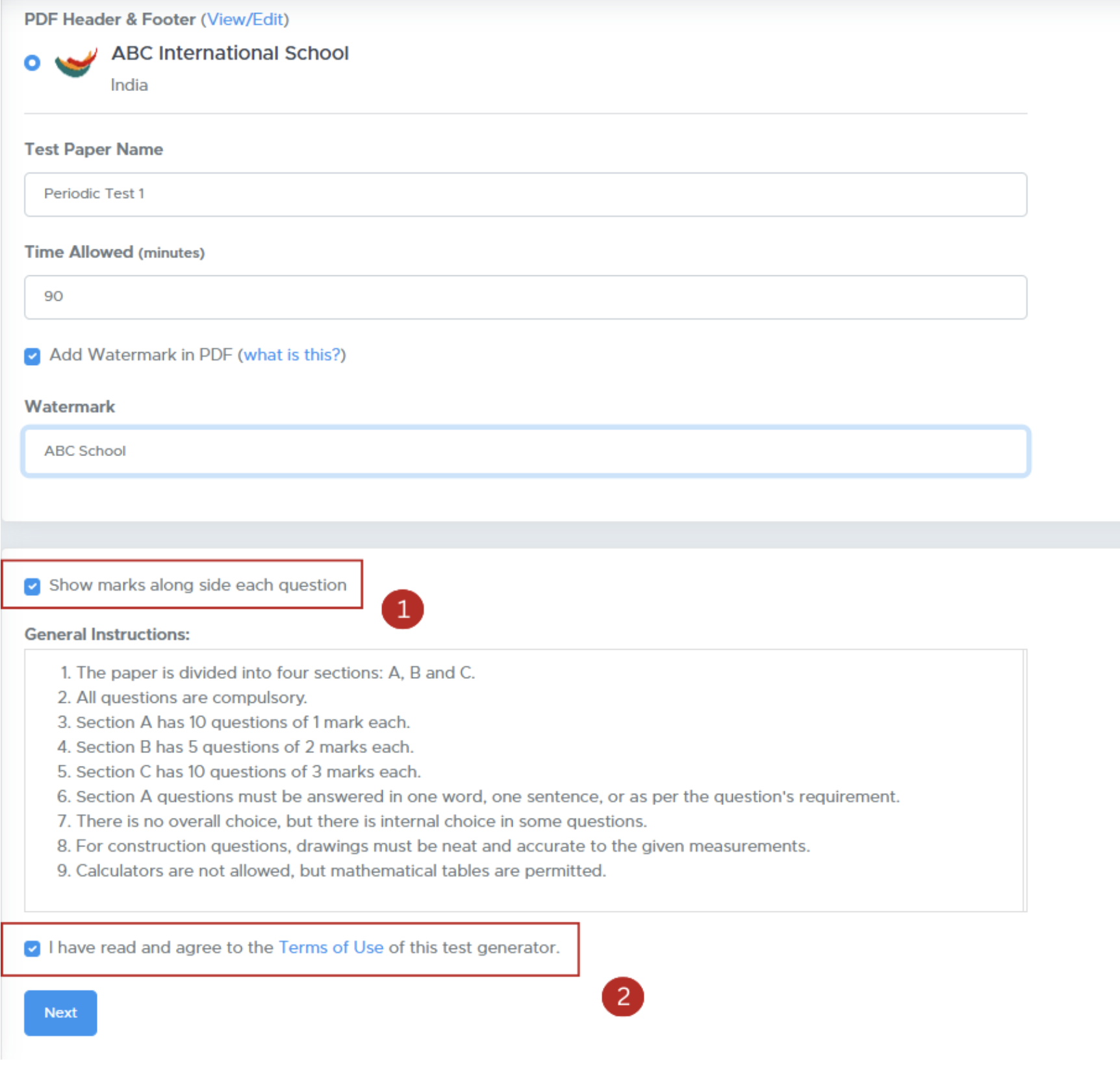
 5. **Specify additional settings:**
* Show marks alongside each question.
* Add general instructions.
6. Accept the **Terms of Use** checkbox and proceed by clicking **Next**.
5. **Specify additional settings:**
* Show marks alongside each question.
* Add general instructions.
6. Accept the **Terms of Use** checkbox and proceed by clicking **Next**.
 ### **Step 6: Final Review and Generation**
Click on **Refresh** to proceed.
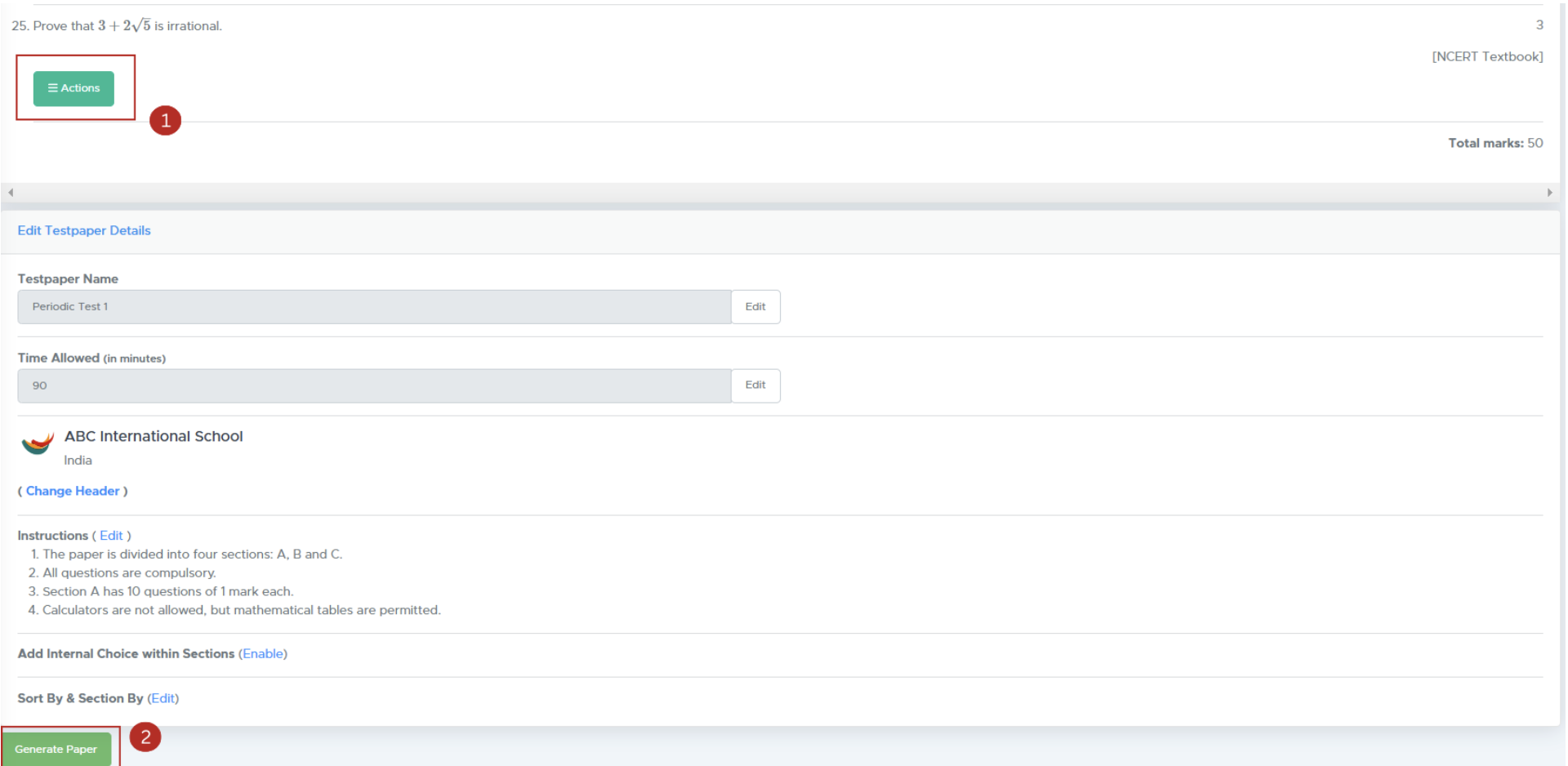
1. Use the **Actions** button to replace or reorder questions. If you want to include internal choices within a section, Tick the checkbox labeled **"Add Internal Choice Within Sections"**
2. **Generate Paper**: Click **'Generate Paper'** to finalize your test paper.
### **Step 6: Final Review and Generation**
Click on **Refresh** to proceed.
1. Use the **Actions** button to replace or reorder questions. If you want to include internal choices within a section, Tick the checkbox labeled **"Add Internal Choice Within Sections"**
2. **Generate Paper**: Click **'Generate Paper'** to finalize your test paper.
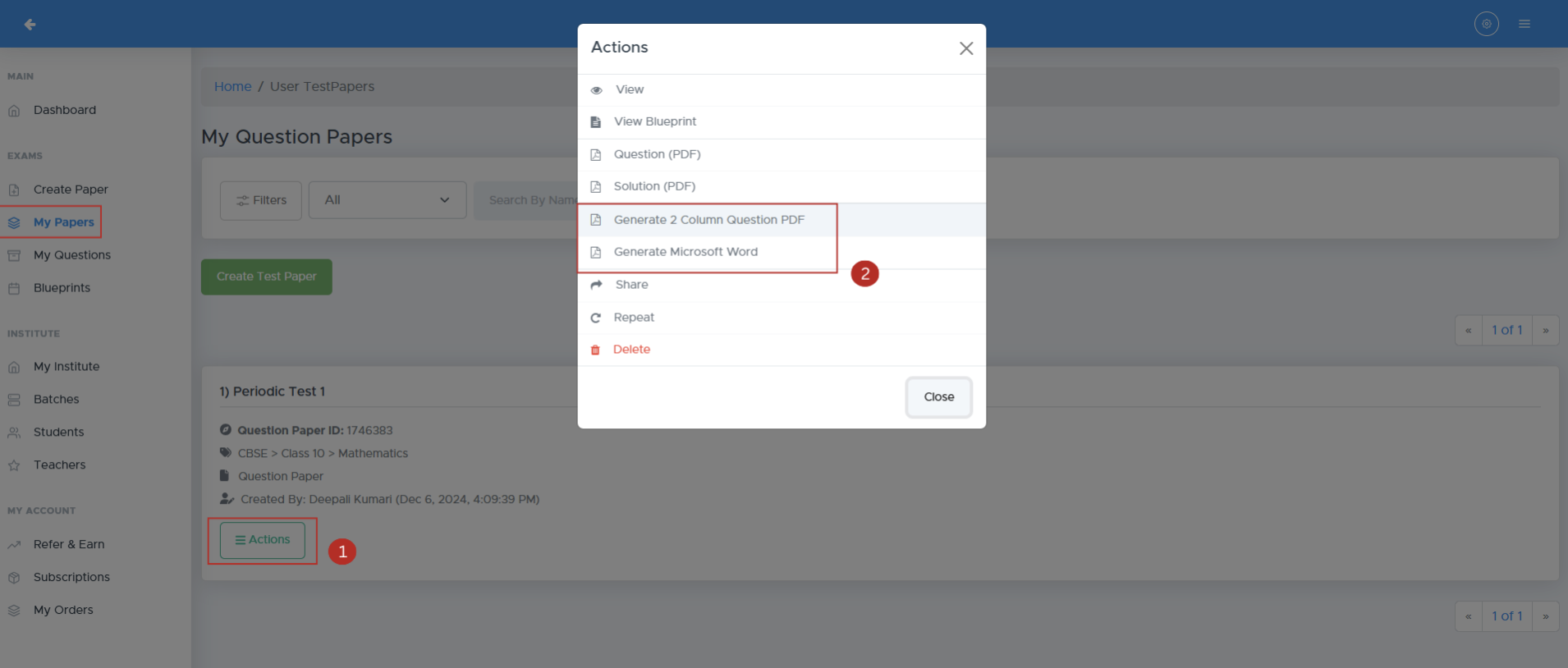
 ### **Step 7: Download Your Test Paper**
1. **Access Your Paper**: After generation, you’ll be directed to the **'My Paper'** page.
2. **Download Format**: Click the **Actions** button to download as .doc (Word) or .pdf.
### **Step 7: Download Your Test Paper**
1. **Access Your Paper**: After generation, you’ll be directed to the **'My Paper'** page.
2. **Download Format**: Click the **Actions** button to download as .doc (Word) or .pdf.
 ## **FAQs**
### **1. What formats are supported for the logo?**
Supported formats include .jpg and .png.
### **2. Can I edit the test paper after generating it?**
No, you can’t edit a paper once it’s generated. However, you can create a copy of it by clicking **ACTIONS** and then **REPEAT**. This will let you make the desired changes in **Step 3**.
### **3. How do I contact customer support?**
You can reach support via the app or email at [contact@examin8.com](mailto:contact@examin8.com)
### **4. Is there a limit to the number of questions I can add?**
Yes, you can add up to **75 questions** (including optional ones) for school subjects. For **entrance** and **competitive exams**, the limit is **200 questions** per paper.
### **5. Can I create papers for competitive exams?**
Yes, Examin8 supports papers for various competitive exams.
## **Contact Support**
For assistance, please reach out to our support team:
* **Email**: [contact@examin8.com](mailto:contact@examin8.com)
* **Phone**: +91-9213522769, +91-8448425258
## **Additional Resources**
* **Video Tutorials**:
* [Creating Question Paper (PDF) in Express Mode](https://youtu.be/3hKQoQoVSW4)
* [Creating Question Paper (PDF) in Automated Mode](https://youtu.be/oIpdcfNjahs)
* [Creating Question Paper (PDF) in Manual Mode](https://youtu.be/d21nLl8rpdY)
* [Creating Online Test (Objective only) in Express Mode](https://youtu.be/bjr3NRSs1T8)
* [Creating Online Test (Subjective + Objective) in Express Mode](https://youtu.be/s6iLpeEKjRQ)
How to Create Question Paper (PDF) in Express Mode
[https://youtu.be/3hKQoQoVSW4](https://youtu.be/3hKQoQoVSW4)
How to Create Question Paper (PDF) in Automated Mode
[https://youtu.be/oIpdcfNjahs](https://youtu.be/oIpdcfNjahs)
How to Create Question Paper (PDF) in Manual Mode
[https://youtu.be/d21nLl8rpdY](https://youtu.be/d21nLl8rpdY)
How to Create Online Test (Objective only) in Express Mode
[https://youtu.be/bjr3NRSs1T8](https://youtu.be/bjr3NRSs1T8)
How to Create Online Test (Subjective + Objective) in Express Mode
[https://youtu.be/s6iLpeEKjRQ](https://youtu.be/s6iLpeEKjRQ)
How to Create Worksheet (PDF) in Express Mode
[https://youtu.be/tyJcnqCBTOk](https://youtu.be/tyJcnqCBTOk)
How to Create Papers with your Own Questions
How to Create Online Test (JEE & NEET) in Express Mode
How to Create Online Test (JEE main) in Auromated Mode
How to Create Online Test (NEET-UG) in Automated Mode
How to Create Online Test (NDA) in Automated Mode
How to Use Examin8 App
How to Create Multiple Sets of Same Question Paper
How to Create Question Paper PDF & Evaluate Online
How to Change Font & Size
How to Customize Blueprints in Automated Mode
How to Edit Question Paper PDF online
How to Group Paragraph Questions
(A) How to Create English Language Papers
(B) हिंदी का पेपर कैसे बनाएँ
## **FAQs**
### **1. What formats are supported for the logo?**
Supported formats include .jpg and .png.
### **2. Can I edit the test paper after generating it?**
No, you can’t edit a paper once it’s generated. However, you can create a copy of it by clicking **ACTIONS** and then **REPEAT**. This will let you make the desired changes in **Step 3**.
### **3. How do I contact customer support?**
You can reach support via the app or email at [contact@examin8.com](mailto:contact@examin8.com)
### **4. Is there a limit to the number of questions I can add?**
Yes, you can add up to **75 questions** (including optional ones) for school subjects. For **entrance** and **competitive exams**, the limit is **200 questions** per paper.
### **5. Can I create papers for competitive exams?**
Yes, Examin8 supports papers for various competitive exams.
## **Contact Support**
For assistance, please reach out to our support team:
* **Email**: [contact@examin8.com](mailto:contact@examin8.com)
* **Phone**: +91-9213522769, +91-8448425258
## **Additional Resources**
* **Video Tutorials**:
* [Creating Question Paper (PDF) in Express Mode](https://youtu.be/3hKQoQoVSW4)
* [Creating Question Paper (PDF) in Automated Mode](https://youtu.be/oIpdcfNjahs)
* [Creating Question Paper (PDF) in Manual Mode](https://youtu.be/d21nLl8rpdY)
* [Creating Online Test (Objective only) in Express Mode](https://youtu.be/bjr3NRSs1T8)
* [Creating Online Test (Subjective + Objective) in Express Mode](https://youtu.be/s6iLpeEKjRQ)
How to Create Question Paper (PDF) in Express Mode
[https://youtu.be/3hKQoQoVSW4](https://youtu.be/3hKQoQoVSW4)
How to Create Question Paper (PDF) in Automated Mode
[https://youtu.be/oIpdcfNjahs](https://youtu.be/oIpdcfNjahs)
How to Create Question Paper (PDF) in Manual Mode
[https://youtu.be/d21nLl8rpdY](https://youtu.be/d21nLl8rpdY)
How to Create Online Test (Objective only) in Express Mode
[https://youtu.be/bjr3NRSs1T8](https://youtu.be/bjr3NRSs1T8)
How to Create Online Test (Subjective + Objective) in Express Mode
[https://youtu.be/s6iLpeEKjRQ](https://youtu.be/s6iLpeEKjRQ)
How to Create Worksheet (PDF) in Express Mode
[https://youtu.be/tyJcnqCBTOk](https://youtu.be/tyJcnqCBTOk)
How to Create Papers with your Own Questions
How to Create Online Test (JEE & NEET) in Express Mode
How to Create Online Test (JEE main) in Auromated Mode
How to Create Online Test (NEET-UG) in Automated Mode
How to Create Online Test (NDA) in Automated Mode
How to Use Examin8 App
How to Create Multiple Sets of Same Question Paper
How to Create Question Paper PDF & Evaluate Online
How to Change Font & Size
How to Customize Blueprints in Automated Mode
How to Edit Question Paper PDF online
How to Group Paragraph Questions
(A) How to Create English Language Papers
(B) हिंदी का पेपर कैसे बनाएँ