

Overview
Test Generator helps Schools, Coaching Institutes, Teachers, and Tutors create Question Papers online in minutes with their names and logo. Already Hundreds of schools and thousands of coaching classes are using it to create:- Question Papers
- Online Tests
- Worksheets and Assignments
One-Time Account Setup
New users can follow our quickstart guide here.
Create Question Papers in Minutes
After one-time account setup, you can start creating question papers. Here is a broad overview of the test generator interface. Click on the START button or CREATE PAPER to continue and then choose your class & subject.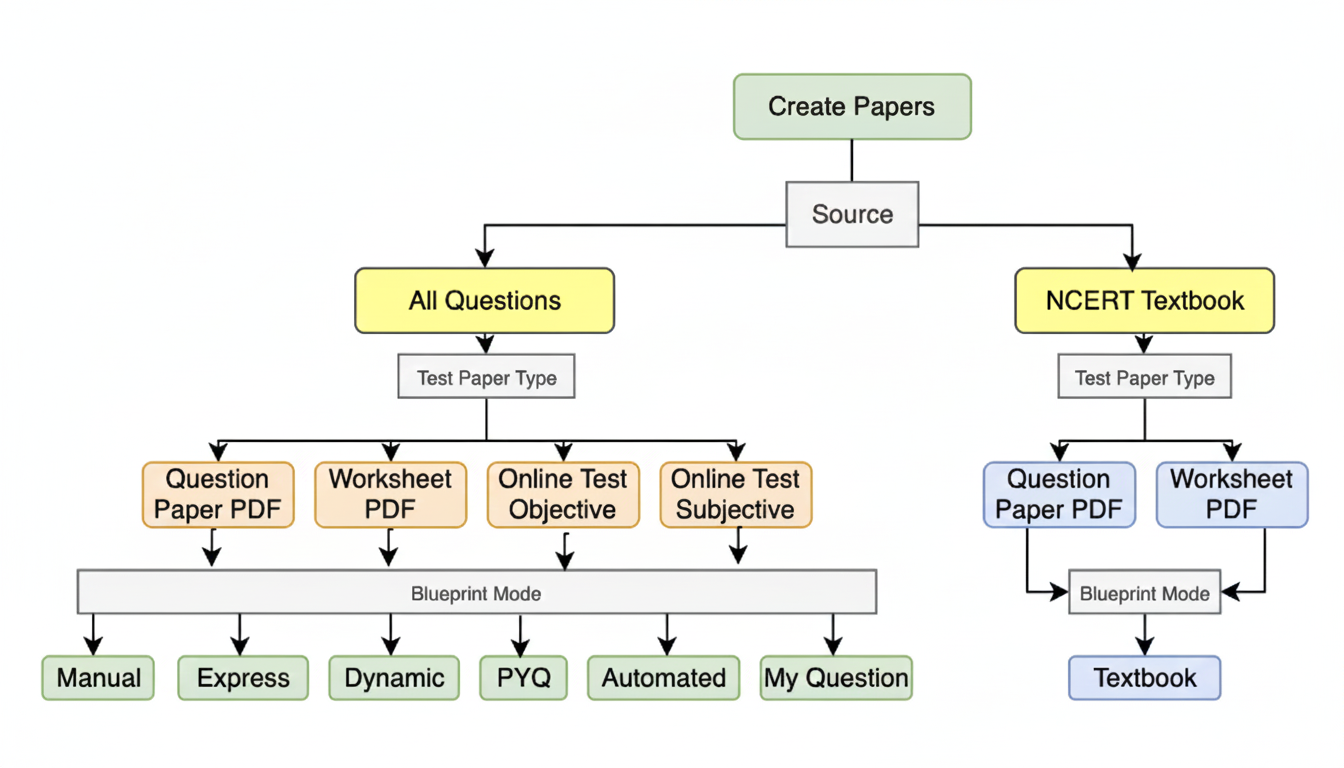
(1) Source of Questions
There are primarily two sources of questions. NCERT Textbook questions and all other questions. Here is a brief description of both of them: (a) NCERT Textbook: If you choose the NCERT Textbook questions option, you will get all the in-text, example, and end-of-chapter questions exactly as they appear in the NCERT textbook. Creating question papers in this mode is completely free, and even with a paid plan, these papers will not be counted or deducted from your quota.NCERT Textbook Mode
Create question papers using NCERT textbook questions. It’s 100% free.
(2) Test Paper Type
After selecting the question source, you will be prompted to choose the type of question paper. If you select the NCERT Textbook, only two options will be available: Question Paper and Worksheet. However, if you choose All Questions (Premium), you will have access to additional options. Below are the types of test papers you can create using the premium feature: (a) Question Paper (PDF/Word): A standard question paper available in PDF and Microsoft Word formats. A separate solutions PDF is also provided. This format is best suited for offline examinations. (b) Worksheet (PDF/Word): Similar to a question paper but without maximum marks, time limit, or general instructions. Ideal for creating worksheets and homework assignments. (c) Online Test – Objective (Link): An online test consisting only of objective-type questions such as MCQs, true/false, fill in the blanks, and one-word answers. Results are generated automatically.Create Online Tests in Minutes
Go through this link to create and conduct Online Tests within minutes.
(3) Blueprint Mode
As part of our standard process, we first create a blueprint before preparing the actual question paper. A blueprint is the foundational framework of a question paper that outlines its overall structure. It clearly defines the number of questions, types of questions, mark-wise distribution, general instructions, total marks, and time duration. This ensures the question paper is well-balanced, systematic, and aligned with assessment objectives. There are multiple blueprint modes available on Examin8 Test Generator. Here is a tabular comparison of all these blueprint modes:| Mode | Expected Time | Skills Required | Flexibility |
|---|---|---|---|
| Manual | 30 Minutes | High | Very High |
| Express | 10 Minutes | Moderate | Moderate |
| Dynamic | 5 Minutes | Minimal | Moderate |
| Automated | 2 Minutes | Minimal | Minimal |
| PYQ | 2 Minutes | Minimal | Minimal |
| My Questions | 60 Minutes | Very High | Very High |
| Textbook | 30 Minutes | Moderate | Moderate |
Create Paper in Manual Mode
Create a blueprint by adding sections and specifying the required number of questions in each section, chapter by chapter. This option is ideal when a high level of customization is needed.
Create Paper in Express Mode
Everything on one page. Just select the required questions from each chapter to create a paper. Suitable if less customization is required.
Create Paper in Dynamic Mode
Select the chapters, and the paper will be generated automatically using a prefilled blueprint for 40, 60, 70 or 80 marks.
Create Paper in Automated Mode
The question paper will be generated automatically based on a predefined blueprint, including specified chapters and chapter-wise weightage.
Create Paper using PYQ Papers
Add your own questions or select questions from your own question bank.
Create Paper with your Questions
Add your own questions or select questions from your own question bank.